
CASTABLE FISH FINDER · FIELD TEST & EXPERIENCE
Garmin Striker Cast Review: Does This Castable Fish Finder Really Help Find Fish?
From shore, you often lack the information boat anglers take for granted: How does the bottom slope? Where do the weeds end? Is there a drop-off or hole in front of the spot? A lead weight tells you the depth. A castable fish finder lets you explore structure, bottom composition, and possible fish signals more systematically.
This article adapts our existing 2021/2023 field test to the new structure. The experiences, strengths, and criticisms remain unchanged. Before buying, check the included accessories, app compatibility, current availability, and price; for an overview of the device market, see our fish finder review.
Why Is a Castable Fish Finder Useful for Shore Anglers?
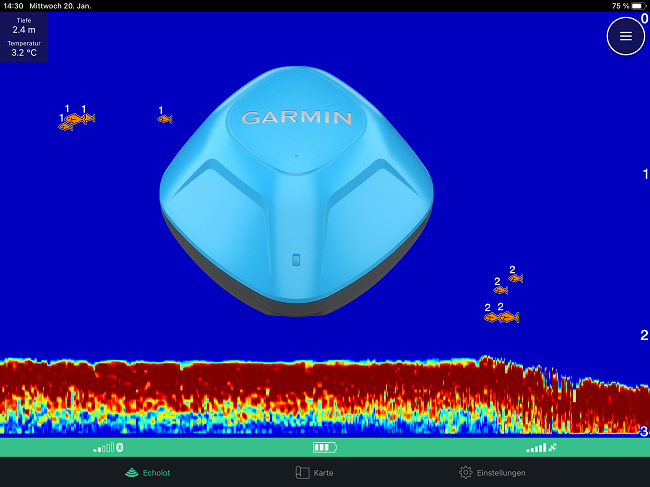
This is especially useful on lakes, canals, stretches of river, in harbors, or from jetties. You can fan-cast across an area and follow the results on your smartphone. This does not instantly reveal a hotspot, but it provides a good foundation: Where does the drop-off run? Where do the weeds begin? Which area slopes more steeply than its surroundings?
A castable fish finder is no substitute for understanding the water. But it can prevent you from fishing for hours at a spot whose contours you do not know. When targeting carp, a gap in the weeds may be interesting; for perch, it may be a small rise or transition; for zander, an abrupt drop. Only the combination of structure, prey, season, and conditions turns this into a real decision.
How Does the Garmin Striker Cast Work?
The waterproof ball switches on through its water contacts. The USB port for charging and possible updates is on the underside. With GPS, the app can show the Cast's position on the map. This allows you not only to see an interesting area but also to find it again later.
Setup is generally simple: Charge the battery, install the app, activate the device in the water, and establish the Bluetooth connection. Our field test found that an old saved Bluetooth connection can cause problems. If the connection fails, first check the previously paired connection on the smartphone or tablet and pair the device again.
How Well Does the Garmin Striker Cast Perform in Practice?
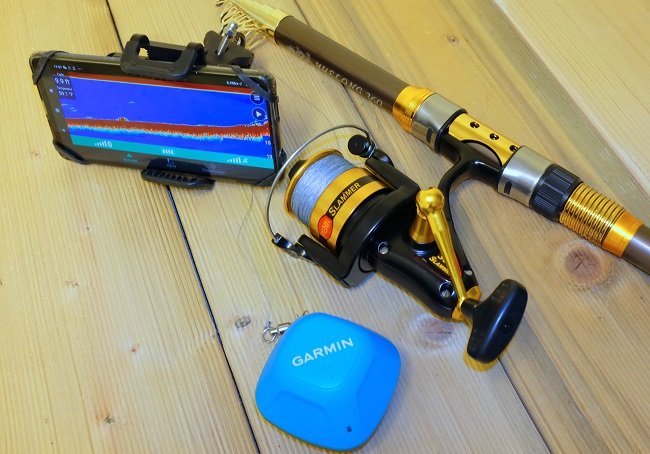
On the water, it is best to begin your search with controlled casts rather than maximum casting distance. Attach the Cast to a sturdy rod, check the drag, and use an abrasion-resistant shock leader. The included snap swivels did not convince us in the original test: We lost the device at exactly that connection. A strong leader and a properly tied knot are the safer choice.
The GPS Cast helps if you lose the device because you can see its position in the app. This is useful but does not guarantee recovery: If the ball is out of range, stuck in a tree, or drifting farther away, you still need a realistic retrieval plan.
After casting, retrieve it through the area as evenly as possible. The sonar data is built up during the retrieve. Erratic changes between stopping, full speed, and drifting make the images harder to compare. If you see an interesting line, cast across it again from a different direction and only then mark the area.
Which Frequency and Sonar View Should You Use with the Striker Cast?
The lower frequency covers a larger area and helps provide an initial overview of depth and bottom contours. The higher frequency provides a second look: A drop-off, weed line, individual object, or notable bottom structure can often be compared more precisely. The right process is therefore not to “look for a fish icon,” but to gain an overview, investigate a possibility, and assess the area.
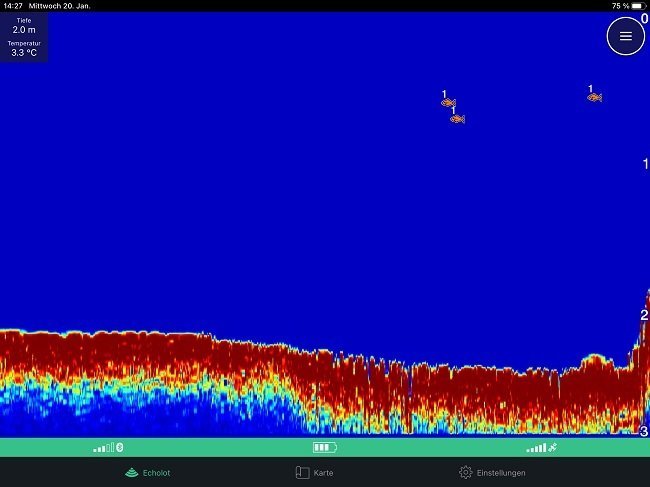
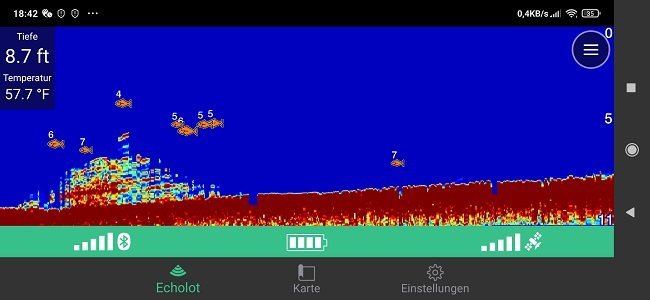
The app can display suspended objects as fish icons. This is useful as an indication but is not infallible: Other signals can also be interpreted as fish. In the field test, fish in a garden pond were reliably detected, but no icon can identify species, size, or willingness to bite. A reading only becomes valuable when it aligns with depth, structure, and behavior.
How Do You Create Your Own Fishing Maps with Quickdraw Contours?
The included base map shows your location, but it is not sufficient for the actual search on its own. Repeated casts allow Quickdraw Contours to build a bathymetric fishing map. You can see where the shore slopes gently, where the bottom drops away, and which small changes may be worth exploring.
The feature is easy to start: Activate recording in the map view, cover the area evenly, and review the mapping afterward. A split screen for the map and sonar would be more convenient; this was an understandable limitation in the existing test. Even so, the map details are surprisingly useful for such a small device.
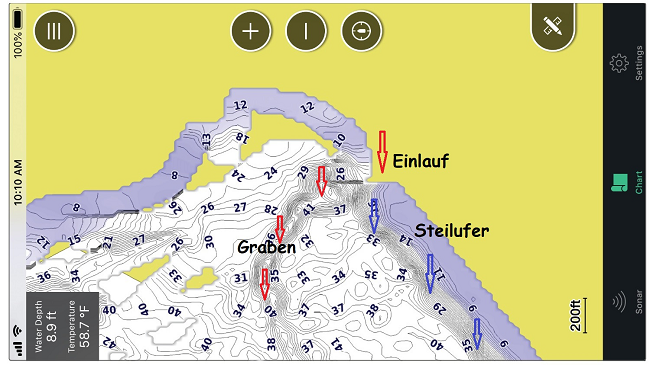
Do not mark every observation. Good waypoints describe a relationship, such as “weed edge 3.5 m,” “hole next to plateau,” or “bait at hard drop-off.” This makes the map genuinely more useful on later visits instead of merely filling it with points.
What Are the Limitations of the Garmin Striker Cast?
In the test, the connection was stable within the usual range but not completely free of interference. Bluetooth has less range and is more susceptible to interference than Wi-Fi. The open USB port must also be kept dry and clean during charging. The waterproof housing itself is straightforward, but proper care remains important.
The depth limitation results from the higher frequencies. It is not a major issue for most shore-fishing areas. Anyone deliberately fishing deeper water at deep reservoirs, large alpine lakes, or in saltwater must check more carefully whether the system provides the required range.
Garmin Striker Cast or Deeper: Which Is the Better Choice?
In the original comparison, the Striker Cast GPS, priced at up to approximately €200, kept pace well with the Deeper Pro+ and was sometimes better for GPS and mapping. However, it could not match the CHIRP capabilities of a Deeper CHIRP. That remains the right question today: Do you want reliable, simple mapping and a straightforward shore-fishing tool, or do you prioritize maximum sonar performance and range?
A castable fish finder becomes valuable when you do not cast it merely out of curiosity. Use it to make better use of your time on the water: Narrow down the area, understand the structure, mark the spot, and check it again later under different conditions. This helps you fish less blindly—before making your first cast.