
SONAR, FISH FINDERS & CHARTPLOTTERS · 2026 COMPARISON
Which fish finder helps you find the right fishing spots faster?
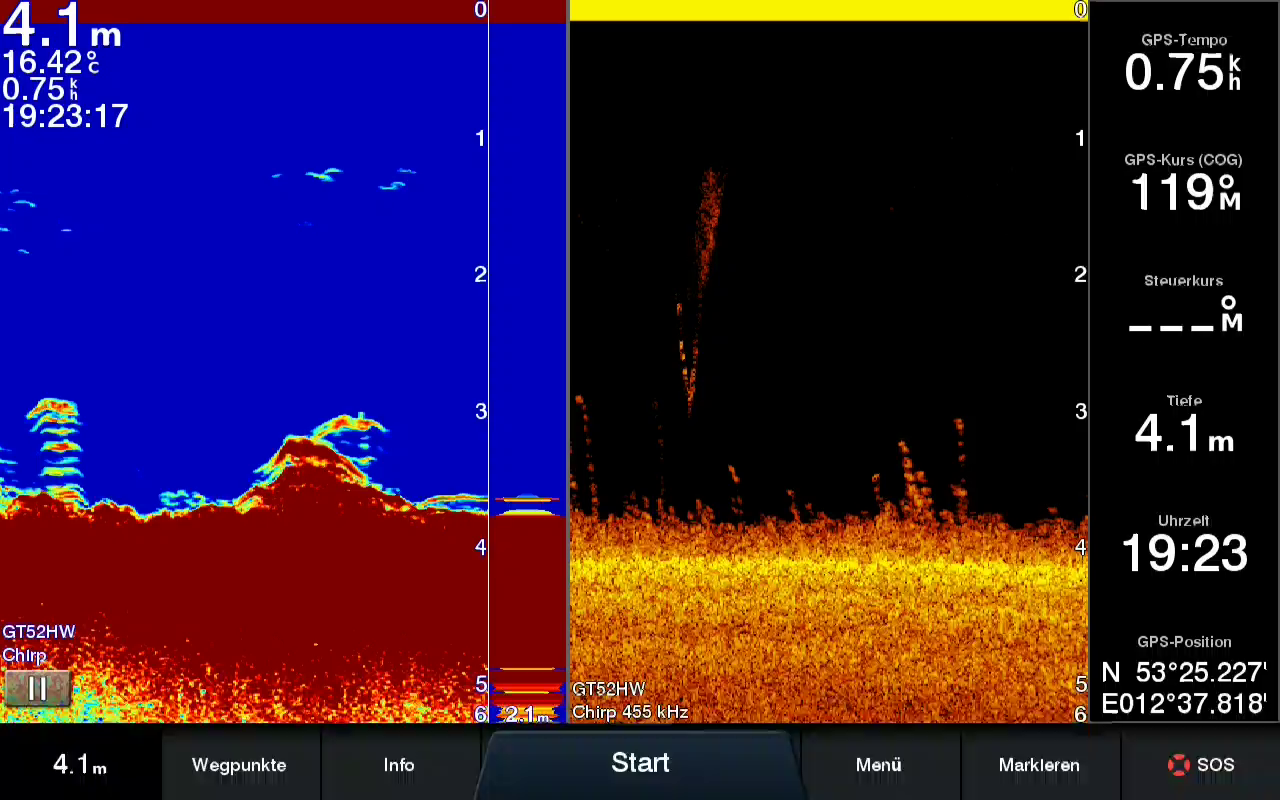
A modern fish finder can do a lot: It shows depth, bottom, vegetation, drop-offs, baitfish and, with live sonar, even movement in real time. That is exactly why choosing one is harder today than it used to be. A unit can look impressive on paper yet ultimately be a poor fit for your boat, power supply or the amount of time you actually spend on the water.
This comparison therefore does not begin with brands and price tags. It starts with a more practical question: What decisions do you want to make better on the water? Scan large areas for structure? Plan ahead on a chart? Find baitfish? Better understand a familiar fishing spot? Or start by learning what is happening beneath you from a belly boat?
If you scan from shore and are not looking for a permanently mounted boat fish finder, first read our 2026 castable fish finder comparison. This device category answers a different question than a chartplotter on a boat.
Which fish finder is the best choice for most anglers in 2026?
This answer does not apply to every angler. Someone who goes out only a few times a year in a small boat, belly boat or kayak often does not need a large networked platform. Someone who primarily searches for zander on large lakes fishes differently from someone tracking schools of perch in a gravel pit lake. And someone outfitting a large boat with multiple displays, transducers and navigation equipment is asking a completely different question from a beginner.
That is why there is no universal test winner here that makes every other unit obsolete. The awards are an assessment by purpose. They are meant to narrow your choices—not create the impression that technology alone catches fish.
Which fish finders and chartplotters suit which applications?
| Unit | Category | Suitable for | Strength | Important limitation |
|---|---|---|---|---|
| Garmin Striker Vivid 7sv | Best for beginners | Beginners, belly boats, kayaks, small boats | Clear controls, 2D/CHIRP, ClearVü and SideVü | No full-featured chartplotter platform, no live sonar |
| Lowrance Eagle Eye 9 | Compelling entry into live sonar | Anglers who want to see lure and fish movement directly | Highly accessible live sonar | Not automatically the most practical complete solution for chart and structure work |
| Lowrance Elite FS 9 | Strong midrange option | Perch, pike and zander anglers focused on reading the water | SideScan, DownScan, charts and expandability | ActiveTarget is an additional system; interpreting images takes practice |
| Garmin Echomap Ultra 2 | Most well-rounded all-around unit | Serious boat anglers and expanding setups | Sonar, charts, controls and LiveScope option | Price and scope are often excessive for occasional use |
| Lowrance HDS Pro | For specialized zander anglers | Advanced anglers, guides, large search areas | SideScan, chart work and a professionally expandable system | More complex and expensive than a practical beginner setup |
| Humminbird XPLORE 10 | Imaging specialist | Anglers with a strong focus on structural details | Highly detailed side and down imaging | Less beginner-friendly; image details require interpretation |
| Garmin GPSMAP 1223xsv | High-end system for large boats | Multiple displays, navigation, networked systems | System performance, networking and expandability | More system than most recreational anglers need |
| Simrad NSS 4 | Premium navigation | Large boats, coastal waters and heavily networked installations | Navigation and system integration | Often not the obvious first choice for a typical predator-fishing boat |
As of August 15, 2026. The technical specifications below were checked against the current manufacturer pages. With fish finders, the specific version matters: A package may include a transducer, while the display-only version may not. Prices, package contents and availability therefore do not belong in a long-term comparison and should be checked with the manufacturer or retailer before purchasing.
How should a fish finder be evaluated in a comparison?
A unit with a strong sonar image is of little help if its controls are so complicated that you stop switching between the chart, SideScan and 2D in wind and drift. An expensive live-sonar solution is of little help if you can watch an individual fish but do not know why it is in that exact location. And an affordable entry-level unit remains valuable for a long time if you use it to reliably learn to read depth, drop-offs, vegetation and distinctive areas.
We therefore weigh five factors: sonar and image quality, charts and GPS, usability, expandability and practical usefulness for finding fish. For practical usefulness, the question is not, “How many features are there?” but, “Can you use it to narrow your search area and then methodically assess a fishing spot?”
This also protects against a common mistake: A single fish symbol or bright spot is not a fishing spot. A repeatable area is more likely to emerge from the combination of depth, bottom, drop-off, vegetation, prey, season and conditions. A good fish finder provides information about these factors. The angler still makes the decision.
What do Live Forward, FishReveal, Active Imaging and the other fish finder features mean?
What do Live Forward and Live Down show?
Live Forward shows what is in front of the boat in real time; Live Down shows what is directly beneath the boat in real time. Both help when casting at specific targets or fishing vertically, but they do not replace searching large areas for structure.
What is FishReveal?
FishReveal overlays CHIRP fish returns on a DownScan image. This makes it easier to distinguish fish from structure directly beneath the boat, but does not by itself explain why the fish is there.
What does Active Imaging mean?
Active Imaging is Lowrance's name for CHIRP, DownScan and SideScan. SideScan is particularly useful for finding drop-offs, vegetation, timber or baitfish to the left and right of the boat without driving directly over every area.
What does “compatible with ActiveTarget 2” mean?
The unit can be expanded with ActiveTarget 2. ActiveTarget 2 is a separate live-sonar system with its own transducer—so “compatible” does not mean it is automatically included in the box.
What does Quickdraw Contours offer?
Quickdraw Contours creates custom depth maps from your trips. This is especially useful on smaller or poorly mapped waters because it turns individual observations into a map you can return to.
What is Dual Spectrum CHIRP?
Dual Spectrum CHIRP is Humminbird's 2D sonar with different transmission ranges. It provides a clear view of the bottom directly beneath the boat and helps you read depth, the bottom line and potential fish returns more clearly.
What do MEGA Down Imaging and MEGA Side Imaging show?
MEGA Down Imaging shows details directly beneath the boat; MEGA Side Imaging shows them to the sides. This allows you to examine weed beds, timber, rocks, transitions and shadows more precisely.
Why are charts, GPS and waypoints more than navigation?
Charts and GPS let you return to an observation. Waypoints allow you to revisit a drop-off, tree or baitfish area under different conditions and learn from it over multiple fishing days.
What are the technical specifications of the units in this fish finder comparison?
Garmin Striker Vivid 7sv: When is an entry-level unit better than a large system?
Short answer: The Striker Vivid 7sv is a good fit if you want a better view of the bottom, drop-offs and areas beside the boat without immediately building an extensive chart and network system. It is particularly practical if the unit will be used regularly on a small boat, kayak or belly boat.
Technical specifications · Striker Vivid 7sv
- Display
- 7 inches · 800 × 480 pixels · Keypad controls
- Sonar
- CHIRP, ClearVü and SideVü · up to 500 W RMS
- GPS & chart
- Integrated GPS, waypoints and Quickdraw Contours; no full-featured chartplotter platform
- Power & protection
- approx. 0.67 A at 12 V · IPX7 · approx. 0.8 kg
Technical specifications and product image: Garmin Striker Vivid 7sv. The transducer included depends on the specific package.
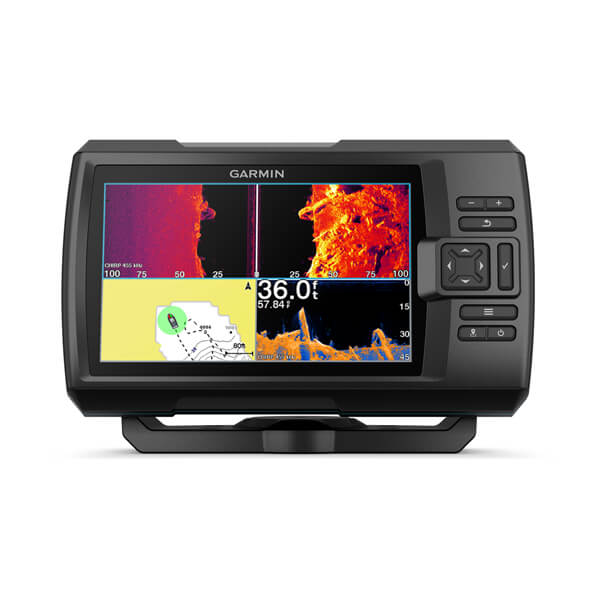
Its strength lies in the straightforward combination of CHIRP, ClearVü, SideVü and GPS. This lets you see not only the depth beneath the boat, but also search to the sides for vegetation, trees, drop-offs or distinctive areas and mark waypoints. For perch, pike and zander, that is already a major step beyond casting blindly.
The limitation is equally clear: Anyone planning to work with charts, fish larger waters, build an expandable system or add live sonar later should consider the platform question early. The Striker is a very good starting point—but it is not a substitute for every future expansion stage.
Lowrance Eagle Eye 9: Who benefits from starting directly with live sonar?
Short answer: The Eagle Eye 9 is compelling if you want to observe fish and lure movement directly and learn from it faster. It is not automatically the best choice for every search for fishing spots because live sonar does not replace interpreting charts, structure and larger areas.
Technical specifications · Eagle Eye 9
- Display
- 9-inch IPS · 1,024 × 600 pixels · 1,000 nits
- Sonar & transducer
- One Eagle Eye transducer: Live Forward, Live Down, CHIRP and DownScan with FishReveal
- Chart & storage
- C-MAP Discover, Genesis Live, GPS and microSD card slot
- Power & protection
- approx. 0.65 A at 12 V · IPX7 · approx. 0.9 kg
Technical specifications: Lowrance Eagle Eye 9. The model intentionally does not offer SideScan; all four views come from one transducer.
When fishing vertically or casting at individual fish, the direct feedback can be highly instructive. You can more readily see whether your lure is running at the right depth and whether a fish rises, follows or turns away. This can help you adjust lure action and presentation more deliberately.
The trap is confusing the screen with the water itself. A live image shows movement at that moment. It does not automatically explain whether you are at a drop-off, a feeding hotspot or merely near a single fish by chance. Use it as a complement to charts and your search pattern, not as a shortcut around understanding the water.
Lowrance Elite FS 9: Why is it strong for systematically reading the water?
Short answer: The Elite FS 9 is particularly compelling if you want to search large areas for drop-offs, vegetation, hard bottom, baitfish and other distinctive structures. SideScan, DownScan, charts and waypoints provide more context than a view directly beneath the boat alone.
Technical specifications · Elite FS 9
- Display
- 9-inch IPS · 800 × 480 pixels · over 1,200 nits · Touchscreen and keys
- Sonar
- CHIRP, Active Imaging DownScan and SideScan; Active Imaging HD through S3100 module
- Chart & live sonar
- C-MAP, Navionics and Genesis Live; compatible with ActiveTarget 2
- Network
- Ethernet, NMEA 2000, Wi-Fi, Bluetooth and one microSD slot · IPX7
Technical specifications: Lowrance Elite FS 9. The transducer and ActiveTarget 2 depend on the selected version or additional components.
This sequence can be especially valuable for zander and perch anglers: First read the chart and shape of the water, then use SideScan to search for interesting lines or objects, drive over the area afterward and only then fish it. You are not searching for the first symbol, but for an area that combines several clues.
This requires a little more involvement from the user. SideScan images do not become automatically understandable just because the display is good. Shadows, slope, bottom, vegetation and baitfish require context. Anglers who enjoy that learning process, however, get a tool that can turn a large area into a well-founded selection of potential fishing spots.
Garmin Echomap Ultra 2: Why is it the all-around recommendation?
Short answer: The Echomap Ultra 2 is the most well-rounded choice if you want to combine charts, sonar and the option to add LiveScope later in an accessible system. It is powerful enough for serious searching without being intended exclusively for professional boat installations.
Technical specifications · Echomap Ultra 2
- Display
- Available in 10- or 12-inch versions; 10-inch version with 1,280 × 800 pixels
- Sonar
- CHIRP plus ClearVü and SideVü; frequencies and transducer depend on the package
- Chart & live sonar
- Garmin Navionics+, Quickdraw Contours, two microSD slots and LiveScope compatibility
- Power & protection
- 10-inch model up to 34 W or approx. 2.3 A at 12 V · IPX7
Technical specifications and product image: Garmin Echomap Ultra 2. The transducer selected in the package determines the sonar features.
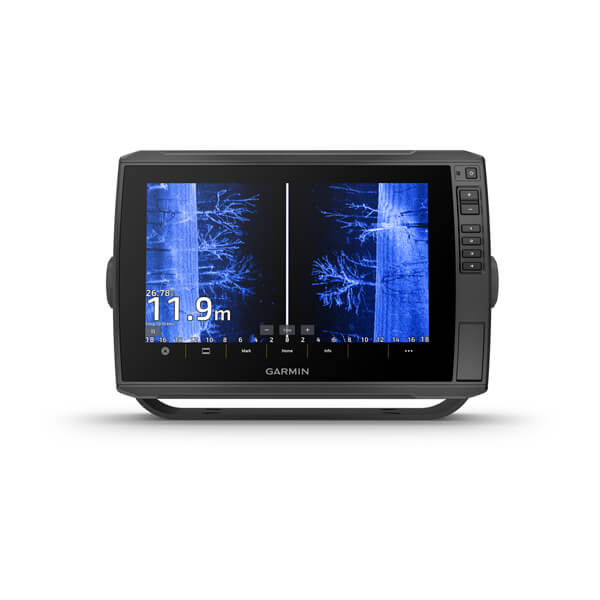
For many anglers, the advantage does not lie in any single feature. The combination of chart work, sonar technology and a control scheme that is quick to understand on the water makes the system compelling. You can plan an area, search drop-offs and structures, save waypoints and inspect them more closely later.
This is especially true for anglers who want to learn their waters better over multiple seasons. A saved waypoint becomes truly useful only when you know what you observed there: depth, bottom composition, prey, season, wind and fish activity. The unit can support this work, but it cannot do it for you.
Lowrance HDS Pro: When do you need a professional system?
Short answer: The HDS Pro suits advanced anglers who want to use structure, charts, SideScan and an expandable live-sonar setup very intensively. For occasional outings, it is often more technology than can be used effectively.
Technical specifications · HDS Pro
- Display
- Series with 9, 10, 12 or 16 inches; HDS Pro 9 with 1,280 × 720 pixels and over 1,200 nits
- Sonar
- CHIRP, Active Imaging HD DownScan and SideScan; compatible with ActiveTarget 2
- Chart & storage
- C-MAP, Navionics and Genesis Live; two microSD slots and internal storage
- Network
- Two Ethernet ports, NMEA 2000 and Wi-Fi; HDS Pro 9 maximum 40 W or approx. 2.9 A at 13 V
Technical specifications: Lowrance HDS Pro. Size, transducer and chart package must be compared separately for the specific model.
Its great strength lies in systematic searching: scanning large areas, marking drop-offs and transitions, returning to interesting zones and, if necessary, inspecting them more closely with ActiveTarget. Especially when fishing for zander, repeatable search routes like these can be more valuable than randomly finding a single fish return.
But the broad range of features also increases your responsibilities. You need proper installation, power supply, suitable settings and time on the water. If you enjoy treating technology as part of your fishing, the system can be very powerful. If you simply want to know the depth, a smaller unit is the better choice.
Humminbird XPLORE 10: When does detailed imaging matter most?
Short answer: The XPLORE 10 is particularly compelling if you place a high value on displaying structure, shadows and bottom differences. It is aimed at anglers who do not merely look at imaging, but deliberately incorporate it into their search.
Technical specifications · XPLORE 10
- Display
- 10.1 inches · 1,280 × 800 pixels · Touchscreen and keys
- Sonar & transducer
- Dual Spectrum CHIRP plus MEGA Down Imaging+ and MEGA Side Imaging+; CMSI+ package with XM 14 HW CMSI T
- Expansion & charts
- Compatible with MEGA Live 2, MEGA 360 and One-Boat Network; two microSD slots
- Power & protection
- 1 kW RMS · approx. 2.2 A · 10.8–20 V · approx. 2.15 kg
Technical specifications: Humminbird XPLORE 10. The transducer listed here refers to the CMSI+ package version.
With weed beds, timber, rocks, mussel beds or prominent transitions, precise imaging can help refine questions: Is the object exposed? How does the drop-off run? Is that really vegetation or a shadow? These questions are often more useful for planning a fishing spot than asking whether a single return looks like a fish.
The downside: More detail does not automatically mean greater clarity. Without practice, an image rich in information can make everything look interesting. Therefore, work with a clear search question and confirm observations with multiple passes.
Garmin GPSMAP 1223xsv: When is a high-end system worthwhile?
Short answer: The GPSMAP 1223xsv is worthwhile if navigation, multiple components and a large display truly need to form an integrated system on your boat. For most small to medium-sized freshwater boats, this range of features makes sense only if you use it regularly.
Technical specifications · GPSMAP 1223xsv
- Display
- 12.1 inches · 1,280 × 800 pixels · Touchscreen and keys
- Sonar
- Supports CHIRP, ClearVü and SideVü; the appropriate transducer is selected separately
- Chart & expansion
- Garmin Navionics+, two microSD slots, networking features and LiveScope compatibility
- Power & protection
- approx. 2.2 A at 12 V · IPX7 · approx. 3.0 kg
Technical specifications and product image: Garmin GPSMAP 1223xsv. A transducer is not automatically included with the display-only model.
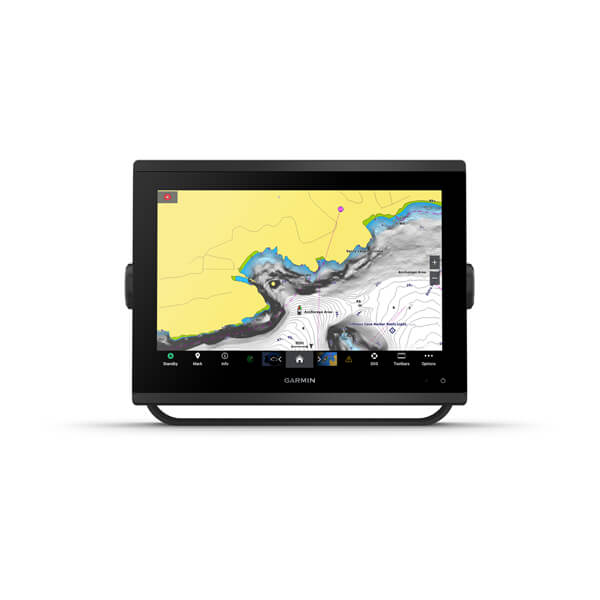
The advantage is not limited to display size. The system can bring navigation, sonar and networked components together in one place. That is powerful if you are genuinely planning to combine chart work, a transducer, motor, second display or other boat data.
Simrad NSS 4: When is premium navigation the right choice?
Short answer: The Simrad NSS 4 is particularly well suited to larger, networked boats and anglers who want to control navigation and sonar technology from a powerful platform. On a typical small predator-fishing boat, it is not automatically a more practical choice than a compact system.
Technical specifications · NSS 4, 10-inch version
- Display
- 10 inches · 1,280 × 800 pixels · over 1,200 nits · Touchscreen, rotary knob and keys
- Sonar
- Dual-channel CHIRP up to 1 kW; Active Imaging and Active Imaging HD supported
- Chart & positioning
- C-MAP X-gen, chart options, 10 Hz GNSS and two microSD slots
- Network & protection
- Ethernet, NMEA 2000 and Wi-Fi · maximum 28 W · IPX6/IPX7 · approx. 1.8 kg
Technical specifications: Simrad NSS 4, 10 inches. The series is also available in 12- and 16-inch versions; these values apply specifically to the 10-inch model.
If you are deciding between this and a smaller system, do not start with display size. First ask: How many outings, how much power, what installation and which features will you actually use in two years? A straightforward unit that you operate on every trip is more valuable than a large system that mostly remains in its menus.
Which fish finder suits your target species?
For zander anglers, charts, Side Imaging, waypoints and a methodical search for drop-offs, transitions and hard areas are often more important than a single fish symbol. The Lowrance HDS Pro suits a highly developed setup; the Elite FS 9 is the much more accessible midrange option for many anglers. Those who prefer a well-rounded Garmin system can combine charts and sonar very effectively with the Echomap Ultra 2.
For perch anglers, what often matters is where baitfish, structure and suitable depth come together. From a kayak or belly boat, a compact system can be more practical than a huge screen. Anglers who want to observe fish and lure movement directly will find a distinctive approach in the Eagle Eye 9; charts and SideScan remain valuable for repeatable area searches.
For pike anglers, weed beds, open-water edges, baitfish and transitions can be crucial. A unit with Side Imaging can help you avoid treating every bay the same. But it does not tell you when a pike is active. Therefore, connect the images with wind, light, season and the way prey is distributed in that body of water.
On a belly boat or kayak, size, power requirements, secure mounting and ease of use supplement the target-species question. A system does not need to be as large as possible to be useful. The Striker Vivid 7sv can be a well-matched solution here if you can use it reliably and then evaluate the images it produces.
Which fish finder technology do you really need?
What do CHIRP and 2D sonar offer?
Short answer: 2D sonar shows information directly beneath the boat; CHIRP can improve target separation and readability. It remains the foundation, but does not replace looking to the sides of the boat or interpreting the location on a chart.
2D is often quicker to understand because you can directly see depth, the bottom line, potential fish returns and changes. Proper expectations matter: A fish arch does not identify the species, size or willingness to bite. Its shape is also created by movement of the boat and fish as well as the sonar cone. Read 2D as a progression and compare areas instead of waiting for a single symbol.
When do Down Imaging and Side Imaging help?
Short answer: Down Imaging provides a more pictorial view of structure beneath the boat, while Side Imaging makes large areas to the left and right visible. Side Imaging is often the more powerful tool for systematically finding fishing spots because you do not have to drive directly over every interesting location.
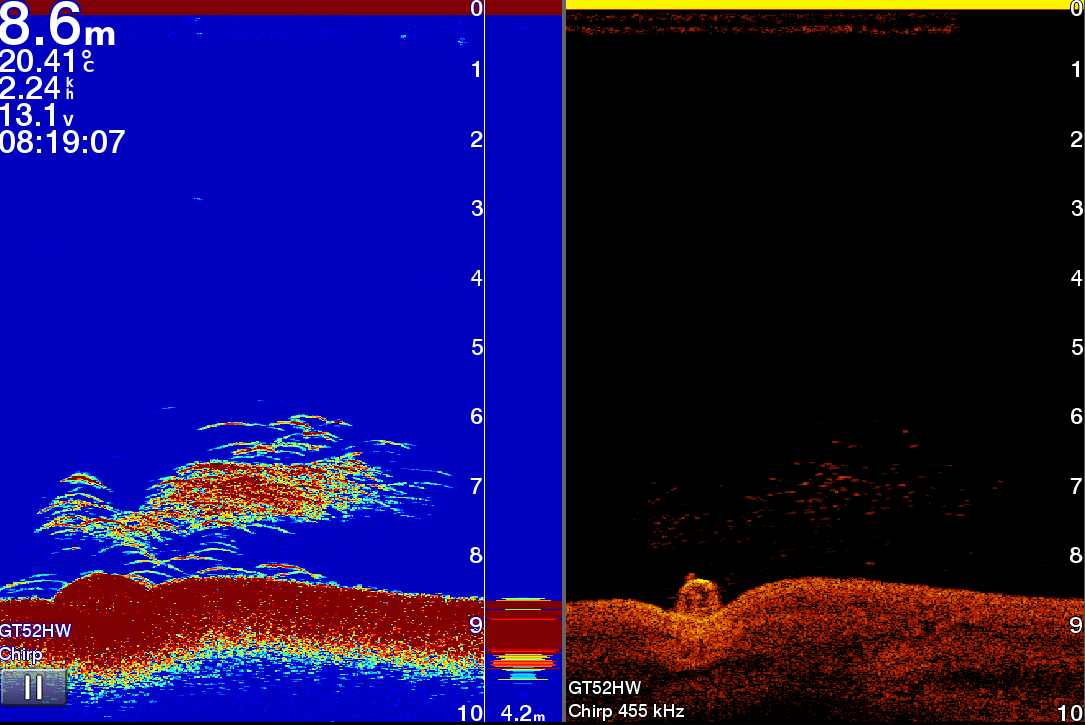
Side Imaging can reveal trees, weed lines, mussel beds, rocks, schools or shadows. The most important skill is not naming every pixel. It is returning over a distinctive area, marking it on the chart and connecting it with depth, bottom and prey.
What does live sonar show—and what does it not show?
Short answer: Live sonar can show lures, movement and reactions in real time. But it does not automatically tell you why a fish is there, what species it is or what structure makes the area attractive over the long term.
That is precisely what makes live sonar valuable and risky at the same time. It can provide faster feedback on lure action and depth. But it can also tempt you to do nothing but chase individual visible fish. Use it to inspect an area that is already interesting: Charts and SideScan take you to a plausible zone; live sonar or a clear 2D/DownScan view helps you inspect it more closely.
Why should GPS and water charts be part of the fish finder decision?
Short answer: GPS and charts turn an observation into a location you can find again. They help you plan drop-offs, plateaus, channels and search routes in advance and inspect them again on another day under different conditions.
A waypoint does not replace understanding the water. It is a reminder of a question: What did I see here? Therefore, do not just save positions; also record mentally or in your system the depth, bottom composition, signs of prey, wind and season. Over time, many points will become a map of your experiences.
Why is even the best fish finder of little use if you cannot read the images?
Many anglers buy good technology and then get stuck on the question, “Is that a fish?” It is understandable, but often not the most useful question. A better question is: What does this area tell me about possible food, cover, depth or a travel route?
In the image above, a depression, hard edge or shadow may stand out. That is not yet a promise of a catch. It is a reason to approach the spot again from a different angle, compare the depth before and behind the structure and view the chart alongside it. Only then does it become a search plan.
That is exactly where the advanced fish finder course (German-language course; English video course coming soon) begins: not with a list of menu settings, but with the question of how to translate sonar images into fishing spots, lure paths and decisions on the water. If you already own or have selected a unit, that is a more practical next step than yet another specification sheet.
Garmin, Lowrance, Humminbird or Simrad: Which brand suits you?
Garmin is a well-rounded choice for many anglers who want controls, charts and sonar technology to work together as simply as possible. The product line is easy to understand, from the entry-level Striker to Echomap and GPSMAP as larger platforms. That does not mean every Garmin solution is automatically a good fit—but many anglers find it easy to get started.
Lowrance is particularly well suited to anglers who deliberately read large areas and want to work with SideScan, charts, waypoints and a potential ActiveTarget setup. The benefit lies in control: You can search areas more systematically. But this freedom also requires a willingness to learn the images and settings.
Humminbird is particularly compelling if you take structural details and imaging seriously. Anyone who wants to compare vegetation, timber, rocks, bottom transitions and shadows precisely should not judge the systems solely by a specification list, but assess them against their own search questions on the water.
Simrad has stronger roots in large, navigation- and network-oriented boat systems. This can make a great deal of sense for coastal waters, large boats or complex installations. For a typical predator-fishing boat on a lake, canal or river, Garmin, Lowrance or Humminbird are often the more direct comparison options.
Frequently asked questions about buying a fish finder
Which is more important: seeing fish or finding fishing spots?
This does not mean fish returns are unimportant. They can confirm a hypothesis or change the direction of your search. But anglers who first look for the most likely area spend fewer hours fishing random spots and develop a better long-term understanding of why a location works.
What is the difference between sonar, a fish finder and a chartplotter?
The term therefore matters less than the function: Do you only need a view beneath the boat, do you want to search areas to the sides, or do you want to use charts and waypoints over the long term? This question sorts the device categories faster than comparing brands.
How important is the transducer?
Therefore, look not only at the unit name, but also at the specific package, mounting on the transom or trolling motor and intended use. Traveling very fast, searching extensively with side imaging or using a flexible mount on a small boat creates different requirements from a stationary view beneath the boat.
How much fish finder do I really need as a beginner?
First learn to read the same area repeatedly: shallow and deep, vegetation and open bottom, drop-off and plateau. Once you can use that information to identify better fishing spots, you will know much more precisely which feature you actually lack later.
Conclusion: Which fish finder will really help you find fish?
For a simple but serious start, the Garmin Striker Vivid 7sv is a clear option. For serious boat anglers, the Garmin Echomap Ultra 2 is the most well-rounded all-around choice. The Lowrance Elite FS 9 is particularly strong if you want to read the water systematically with SideScan and charts; the HDS Pro, XPLORE 10, GPSMAP 1223xsv and Simrad NSS 4 each address more specialized needs.
However, the most important point remains: A fish finder does not make decisions for you. It can help you rule out unproductive areas faster and inspect interesting fishing spots more precisely. What you make of that depends on the interaction of the water, fish, season, observation and experience.